Mobile vs Desktop Trading Platforms: Which Is Better?
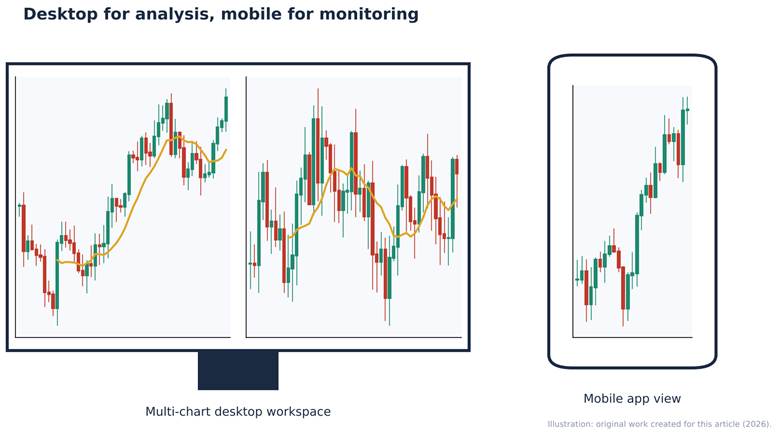
Figure: Illustration of a multi-chart desktop trading workspace beside a mobile trading app view. Original illustration created for this article.
Mobile vs Desktop Trading Platforms: Which Is Better?
Short answer: Neither is better for everyone. Desktop platforms are better for analysis-heavy work: multi-chart layouts, complex options orders, scanners and risk dashboards. Mobile apps are better for monitoring positions, placing simple orders and reacting when you are away from your desk. Most serious investors use both, doing research on a large screen and using the phone as a remote control.
The gap between the two has narrowed. Many brokers now offer the same platform in desktop, web and mobile versions. Schwab's thinkorswim, for example, is available as a downloadable desktop application, a browser version and a mobile app, and Fidelity's newer Fidelity Trader+ comes in desktop, web and mobile forms. Yet the screen size, input method and connection quality still change how well you can trade.
Core Differences at a Glance
| Factor | Desktop platform | Mobile app |
| Screen space | Multiple monitors, many linked windows | One small screen, usually one view at a time |
| Charting | Full indicator sets, drawing tools, custom studies | Simplified charts; fewer tools fit comfortably |
| Order types | Complex, multi-leg, conditional and algorithmic orders | Core order types; complex orders may be limited |
| Speed of analysis | Fast for scanning many instruments | Fast for checking one position |
| Connection | Usually wired or stable Wi-Fi | Mobile data can drop or lag |
| Error risk | Lower; easier to review order tickets | Higher; "fat-finger" taps are more common |
| Convenience | Tied to a location | Available anywhere |
Where Desktop Platforms Win
Deeper analysis
A desktop setup lets you see a daily chart, an intraday chart, an options chain and a news feed together. Interactive Brokers' Trader Workstation, for instance, offers more than 100 order types plus algorithms such as VWAP and TWAP, along with real-time margin and P&L monitoring. Using that range comfortably requires a large screen.
Risk review before you click
On a desktop, the order confirmation shows quantity, price, estimated cost and margin impact in full. Reviewing a four-leg options order on a phone is possible, but it is easier to miss a wrong strike or expiry.
Customisation and automation
Desktop software typically supports saved workspaces, hotkeys, custom scripts and API connections. If you test strategies or run screeners across hundreds of stocks, a computer is the practical choice.
Where Mobile Apps Win
Monitoring and alerts
Price alerts, order-fill notifications and news push alerts are where phones shine. If your strategy is long-term investing, you may rarely need more than a mobile app.
Simplicity for beginners
Mobile apps strip away clutter. For someone buying an index ETF every month, a simple app reduces the chance of being overwhelmed by features they do not need.
Acting quickly when away
If a stop-loss needs adjusting during a commute, a mobile app makes that possible. In India, apps like Zerodha Kite and Groww let investors place delivery orders, check holdings and manage SIPs from a phone.
Practical Examples
Example 1 – The long-term ETF investor. Priya invests a fixed amount every month in a diversified index fund. She checks her portfolio once a week. A mobile app covers everything she needs, and a desktop platform would add complexity without benefit.
Example 2 – The swing trader. Daniel holds stocks for a few days to a few weeks. He scans charts each evening on a desktop, sets entry and exit orders, and uses the mobile app during the day only to check fills and alerts. This hybrid approach is the most common pattern among active traders.
Example 3 – The options trader. Meera trades spreads. Building multi-leg orders, checking the Greeks and reviewing margin impact all happen on desktop. She avoids opening new spreads on her phone and uses mobile only to close positions in an emergency.
Security Considerations
Both channels can be secure, but the risks differ.
- Mobile: lost or stolen phones, public Wi-Fi and malicious apps are the main threats. Use device-level biometrics, a screen lock and your broker's two-factor authentication.
- Desktop: shared computers, outdated operating systems and phishing emails are the bigger risks. Keep software updated and never save passwords on shared machines.
Regulators such as SEBI and the US SEC regularly warn investors about fake trading apps and impersonation scams. Download apps only from official app stores or the broker's own website.
Pros and Cons
Desktop platforms
- Pros: deep analysis, complex orders, better review of risk, automation support
- Cons: tied to one place, steeper learning curve, may require a powerful computer
Mobile apps
- Pros: convenience, instant alerts, simple interfaces, good for monitoring
- Cons: limited screen space, higher error risk, connection dependence, encourages impulsive trading
How to Decide
1. Define your style. Long-term investors can rely mainly on mobile; active traders need a desktop.
2. Check feature parity. Confirm which order types and tools exist on each version of your broker's platform.
3. Use paper trading. Platforms such as thinkorswim include a simulated trading mode, which lets you practise on both devices without risking money.
4. Set rules for mobile use. For example: no new complex positions from the phone, only closes and adjustments.
Key Takeaways
- Desktop platforms are better for research, complex orders and risk review.
- Mobile apps are better for monitoring, alerts and simple trades.
- Most brokers now offer desktop, web and mobile versions of one platform, so you can combine them.
- Order-entry mistakes are more common on small screens; build safeguards.
- Your trading frequency and strategy should decide your primary device.
Frequently Asked Questions
Is it safe to trade stocks on a mobile phone?
Yes, provided you use the broker's official app, enable two-factor authentication and biometric locks, and avoid public Wi-Fi for trading. The main extra risk is accidental order entry on a small screen.
Do professional traders use mobile apps?
Most use them for monitoring and alerts, but they conduct analysis and place complex orders on multi-monitor desktop setups.
Are mobile trading apps slower than desktop platforms?
Order transmission speed is usually similar, but mobile connections can be less stable and the time needed to review information is longer, which can affect results in fast markets.
Can I place options spreads on a mobile app?
Many brokers support multi-leg options orders on mobile, but reviewing strikes, expiries and margin impact is easier on a larger screen. Check your broker's mobile feature list.
Should beginners start on mobile or desktop?
Beginners investing for the long term can start on mobile. Anyone planning to learn technical analysis or active trading should practise on a desktop or web platform, ideally in a paper-trading account first.
Financial Disclaimer
This article is for general information and education only and does not constitute investment, financial, legal or tax advice, or a recommendation to buy or sell any security. Investing in securities involves risk, including possible loss of principal. Fees, features, rankings and regulations cited were checked against the listed sources on 15 October 2026 and may change without notice. Verify current details with the provider or regulator and consider consulting a SEBI-registered investment adviser, a FINRA-registered professional or another qualified adviser before making financial decisions.
Source References
1. Charles Schwab – thinkorswim platforms — https://www.schwab.com/trading/thinkorswim
2. Fidelity – Transition to Fidelity Trader+ — https://www.fidelity.com/investing/trading-platforms/active-trader-pro-transition
3. Interactive Brokers – Trader Workstation — https://www.interactivebrokers.com/en/trading/tws.php
4. Zerodha – Charges and platform information — https://zerodha.com/charges/
All sources were accessed on 15 October 2026.
Suggested Internal Links
| Anchor text | Suggested URL |
| Top Commission-Free Trading Apps Compared | /commission-free-trading-apps-compared |
| Advanced Trading Platforms for Professional Investors | /advanced-trading-platforms-professional-investors |
| Stock Market Education for Beginners | /stock-market-education-beginners-guide |